newrelic-agent-control
Remote update
Remote update is a capability of Agent Control that enable updating its version remotely, using Fleet Control. That includes Flux in Kubernetes. However, this feature is not available in all the supported systems yet.
Supported systems
| System | Supported |
|---|---|
| OnHost | ✅ |
| Kubernetes | ✅ |
Kubernetes
In Kubernetes, both the Agent Control version and Flux version can be updated remotely. We provide a Helm Chart to install Agent Control, which installs the latest version of Agent Control and Flux 2.15.0. There are some caveats.
Caveats
Updating Agent Control version
We could receive a remote configuration with an older Agent Control version which doesn’t support this feature. In that situation, the Agent Control would end up in a “non-recoverable” state. Updating it would require access to the system. Ideally, the backend should prevent that.
Another risk updating the Agent Control version is that the new version might not support an Agent Type. Be it because it’s not yet supported or because it’s out of support.
Updating Flux version
Flux it’s a project of the CNCF with their own roadmap. Thus, we have to be aware of breaking changes introduced in flux2, and potential compatibility issues with the Kubernetes version that we are using. That information is usually in the changelog. For example, v2.6.0.
Flux is wrapped in the agent-control-cd chart, which is used internally. The client doesn’t interact with it directly. The version of this chart is what we allow updating, instead of the Flux version. Hence, we control the versions of flux that can be installed. For now, we don’t support flux version with breaking changes. Migrations are not automated.
How it works
On-host
Fleet Control pushes a remote config containing a version field. Agent Control downloads the specified OCI artifact, verifies its signature, self-replaces its binary, and restarts.
version field (remote config)
The version field controls which version Agent Control should upgrade to.
An absent version and an empty version: "" are both treated as no-ops — neither will trigger an update. This prevents accidental fleet-wide upgrades caused by pushing an unset version field.
Valid version formats follow OCI distribution-spec rules:
- Tag only:
v1.2.3,latest,1.0.0-alpha - Digest only:
@sha256:<64 hex chars> - Tag + digest (pinned):
v1.2.3@sha256:<64 hex chars>
Happy path
- Fleet Control sends a remote config with a
versionfield via OpAMP. - Agent Control validates the version (absent or empty → no-op; invalid format → error).
- Agent Control downloads the OCI artifact for the specified version and verifies its signature.
- Agent Control self-replaces its binary and publishes a restart event.
- The process manager restarts Agent Control with the new binary.
Configuration
Self-update must be explicitly enabled. See the self_update configuration for details.
Kubernetes
Installation
For Kubernetes, we provide Helm Charts to simplify the installation process. There are three charts:
agent-control- Starts the installation of Agent Control and all the necessary tools.agent-control-deployment- This chart is designed to be installed as part ofagent-controlchart, and it installs Agent Control.agent-control-cd- This chart is designed to be installed as part ofagent-controlchart, and it installs Flux.
Why do we need three charts?
agent-control is there to orchestrate the installation and uninstallation, while the other two charts allow Agent Control handling the remote update of each component.
agent-control-deployment and agent-control-cd charts represent the Agent Control and Flux resources respectively, each chart will be managed by a HelmRelease which represents the desired state of such resources in the cluster.
That’s the reason for having three charts.
The following image shows the installation process.
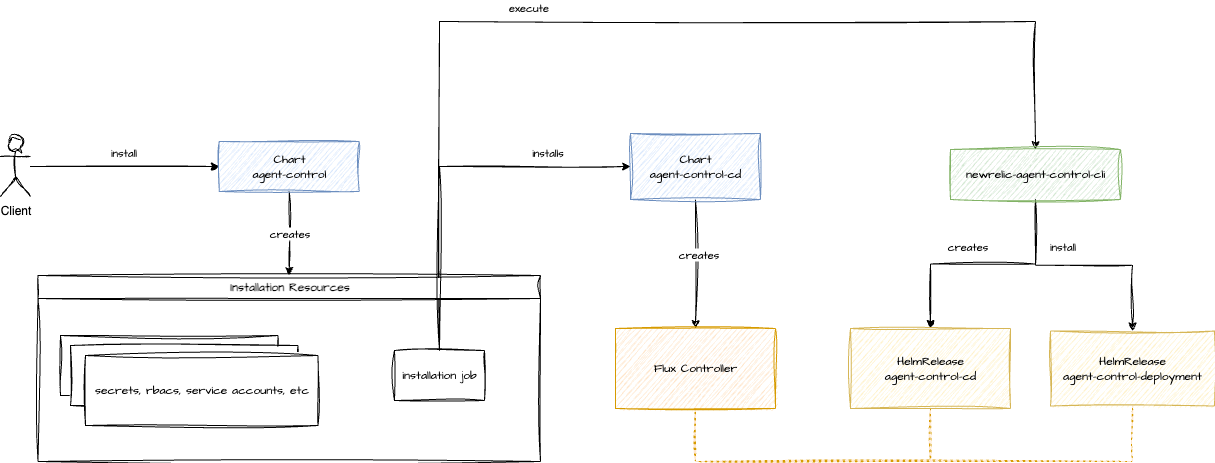
- The client initiates installation by deploying the
agent-controlchart with Helm - The
agent-controlchart creates Kubernetes resources necessary for the installation job and and launches it - This installation job deploys
agent-control-cd(which installs Flux throughhelm upgrade --install) and executes a CLI tool - The CLI tool creates the CRs representing the
agent-control-cdrelease (which takes ownership of the existing installation) and installs theagent-control-deploymentby creating the corresponding CRs - Finally,
agent-control-deploymentestablishes the required resources (rbacs, secrets, config maps, a job to register a system identity, …) for the pod that will launch the Agent Control binary
Uninstallation
The uninstallation process is a bit different.
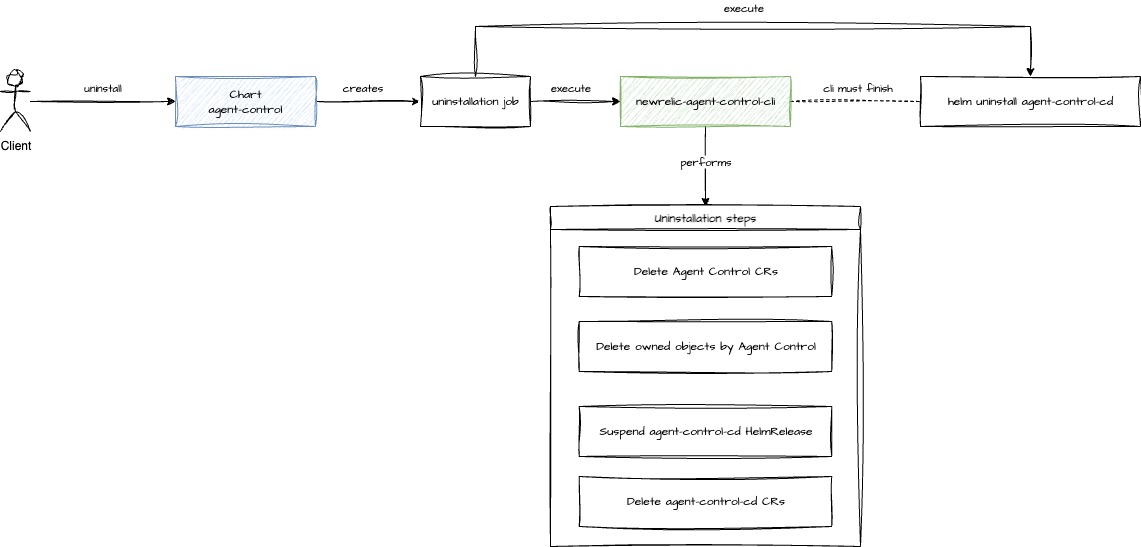
- The client initiates the uninstallation of
agent-controlchart - The
agent-controlchart creates the uninstallation job - The uninstallation job executes a CLI
- The CLI then uninstalls both the
agent-control-cdandagent-control-deploymentmaking sure that all resources are deleted 4.1. Deletes Agent Control CRs 4.2. Deletes objects owned by Agent Control 4.3. Suspends theagent-control-cdHelmRelease4.4. Deletes the Flux CRs - The
agent-control-cdis uninstalled throughhelm uninstall
Agent Control
This is the happy path:
- Fleet Control sends a new remote config with the updated version through OpAMP
- Agent Control receives and validates the configuration
- Agent Control applies the update on the system
The implementation is, of course, more complex.
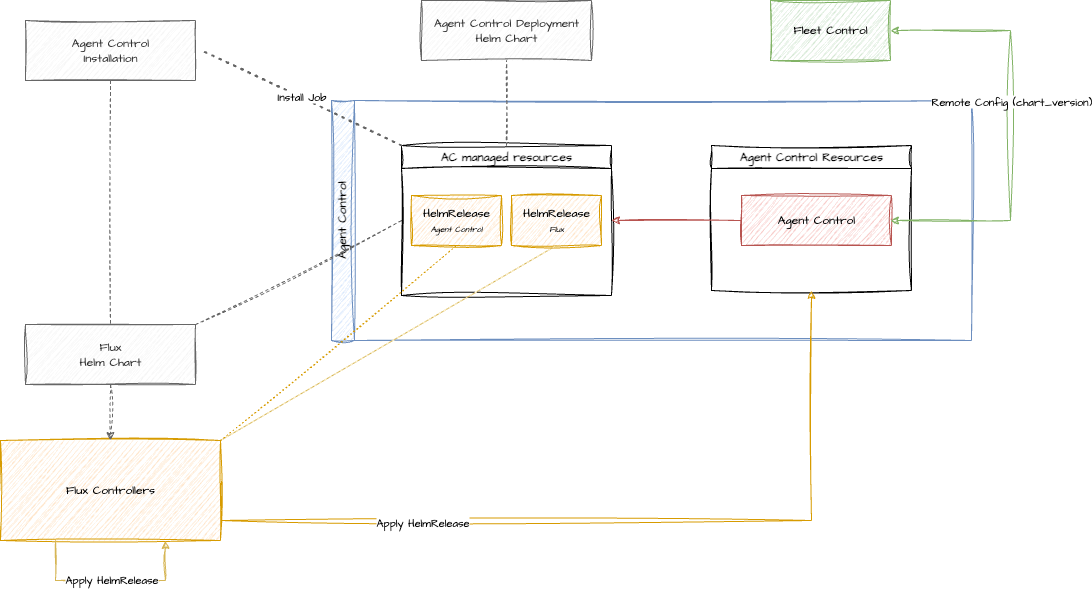
-
Receive Configuration: The process begins when a new remote config is received in the
process_eventsfunction, which then passes it tohandle_remote_configfor processing.Example:
agents: nr-infra: newrelic/com.newrelic.infrastructure:0.1.0 chart_version: "1.0.0" cd_chart_version: "1.0.0" - Report Initial State: To provide visibility, Agent Control reports its status as
Applying. - Validate and Apply: The new configuration is validated and stored by the
validate_apply_store_remote_configfunction. On success, this function updates Agent Control’s ownHelmReleasewith the new version and/or the FluxHelmRelease. - Report Final State: Once the configuration has been successfully applied to the HelmRelease object, Agent Control reports its status as
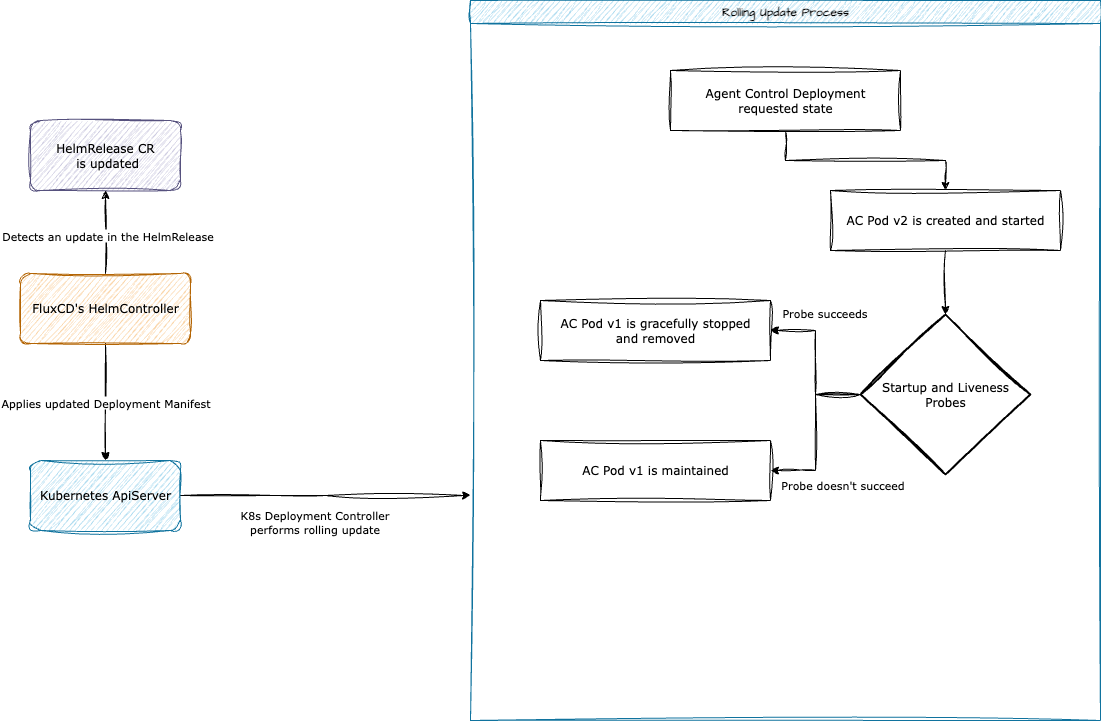
Applied. - Reconcile in Cluster: Flux’s Helm Controller detects the change to the
HelmReleaseand begins a rolling update of the Agent Control pods to finalize the process.
If there’s any error, Agent Control will send Failed status. If everything went well, codewise, but Flux cannot reconcile the different HelmRelease. Then, Agent Control will send the Applied status and the HealthChecker will report Unhealthy. You can think of this in the following way. Agent Control did the job and started the process to apply the configuration. There was no problem there. However, Flux cannot turn the config into reality. Agent Control will detect the error and return Unhealthy from spawn_health_checker.
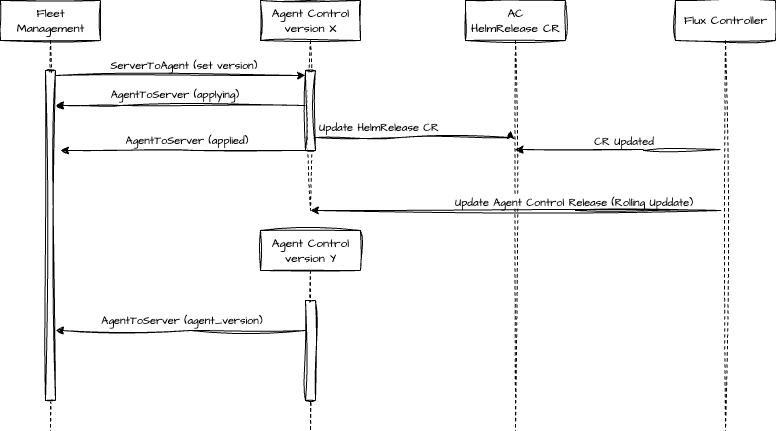
The rolling update is an strategy implemented by kubernetes that incrementally replaces old pods with new ones. It’s done in such a way, that old pods will be kept alive if new ones can’t be started. Kubernetes assures it with Liveness and Startup probes.
Onhost Remote Update resilience: retry and backoff
The on-host self-update is driven by the desired version in the OpAMP remote config and is re-evaluated on every poll. To not re-attempt a failing upgrade on every poll, hammering the OCI registry, the updater uses exponential backoff with jitter.
- Download retry: within a single attempt the OCI download is retried up to
max_attempts, sleeping between tries, to absorb transient blips. - Upgrade backoff: when a whole attempt fails, a non-sleeping cooldown gate keyed by target version suppresses re-attempts across polls; after
max_consecutive_failuresit only escalates logging (not terminal) and keeps probing everymax_delay, and a new desired version resets it.
Config — self_update.download_retry:
| Field | Default | Meaning |
|---|---|---|
max_attempts |
3 |
Total download attempts (validated >= 1). |
base_delay |
1s |
First backoff delay; doubles each retry. |
max_delay |
30s |
Cap on the per-retry delay. |
jitter |
true |
Randomize each delay within [0, computed]. |
Config — self_update.upgrade_backoff:
| Field | Default | Meaning |
|---|---|---|
max_consecutive_failures |
5 |
Consecutive failures before suppression is reported as “capped” (validated >= 1). Not a hard stop. |
base_delay |
30s |
First cooldown window; doubles each consecutive failure. |
max_delay |
600s |
Cap on the cooldown window (the steady-state retry cadence during a sustained outage). |
jitter |
true |
Randomize each cooldown within [0, computed]. |
Example configuration (values shown are the defaults):
self_update:
  enabled: true
  download_retry:
    max_attempts: 3
    base_delay: 1s
    max_delay: 30s
    jitter: true
  upgrade_backoff:
    max_consecutive_failures: 5
    base_delay: 30s
    max_delay: 600s
    jitter: true